
We have detected that the browser you are using is not fully supported by the projstream.com web site. You can view this site using your current browser but it may not display properly, and you may not be able to fully use all features.

Projstream.com is best viewed using the following browsers:

Click on one of the links above to download the browser of your choice. Once the download has completed, install the browser by running the setup program.

Home

Contact Form

To prevent automated spam submissions leave this field empty.

Phone:(800) 914-1710
Fax:(888) 243-5130
E-Mail: mail@projstream.com

ProjStream News

  • Earned Value Software - EVMax

    With workflow and collaboration capability, forecast trending and graphical reporting in the same application, EVMax is more thant a cost / earned value engine.

    8th of February 2013

  • Benefits of Parametric Estimating - BOEMax Estimating Software

    What are the benefits of parametric estimating? How can BOEMax assist you in your parametric estimating initiative.

    6th of February 2013

  • IPM Conference

    IPM will be hosting a conference on November 18 – 20, 2013 in Bethesda, Maryland.

    22nd of January 2013

  • AACE Annual Meeting

    AACE International’s Annual Meeting brings together the industry’s leading cost professionals in a forum focused on learning, sharing, and networking. Over 100 hours of technical presentations will challenge you to better manage, plan, schedule, and...

    22nd of January 2013

  • PMI SCoP Annual Conference

    The PMI SCoP Annual Conference will take place from Wednesday 19 June 2013 through Saturday 22 June 2013, at the Caribe Royale All Suites Resort in Orlando, Florida, USA. Information about presentations, speakers, registration fee and PDUs will be...

    22nd of January 2013

  • EVM World 2013

    The EVM World 2013 Conference is your chance to learn about project performance techniques, including earned value management (EVM). The conference provides training, current topics from practicing professionals, access to world leaders in project...

    22nd of January 2013

  • Collaborate 13

    A technology and applications forum for the Oracle community, Collaborate is hosted by three of Oracle’s biggest and most influential users groups: The Independent Oracle Users Group (IOUG), The Oracle Applications Users Group (OAUG), and The Quest...

    22nd of January 2013

  • AACE Winter Workshop

    The Western Winter Workshop is an annual event presented by the San Francisco Bay Area and Southern California Sections of AACE International that includes two and a half days of capital management and technical presentations showcasing the very...

    22nd of January 2013

  • NDIA PMSC Meeting

    The next NDIA PMSC meeting will be hosted by ATK, Humphreys & Associates, and SAIC at the ATK facility in Clearwater, Florida.

    22nd of January 2013

  • ProjStream, Government Cost Proposal Soultion at 24th IPM Conference

    ProjStream, based in Orlando, FL., will be in attendance at the annual IPM Conference in Bethesda, MD. this year from Oct. 29-31. ProjStream will be presenting their BOEMax software for developing government contract proposals and cost solutions.

    14th of January 2013

Title Category Date
Earned Value Software - EVMax Software 02/08/2013
Benefits of Parametric Estimating - BOEMax Estimating Software Concepts 02/06/2013
IPM Conference Events 01/22/2013
AACE Annual Meeting Events 01/22/2013
PMI SCoP Annual Conference Events 01/22/2013
EVM World 2013 Events 01/22/2013
Collaborate 13 Events 01/22/2013
AACE Winter Workshop Events 01/22/2013
NDIA PMSC Meeting Events 01/22/2013
ProjStream, Government Cost Proposal Soultion at 24th IPM Conference Software 01/14/2013
EVMax: Earned Value Management Software Software 01/14/2013
Government Contract Pricing and Proposal Software: A message from DCMA Software 01/14/2013
Earned Value Management In the Department of Defense News 01/14/2013
The Basis of Estimate News 01/14/2013
Cost Proposal and Schedule Baseline.......Are they in synch? News 01/14/2013
What is a basis of estimate? News 01/14/2013
Does Project Management Need To Be People Management? Concepts 01/14/2013
Taking Over a Project in the Red-a PMP's Time to Shine Concepts 01/14/2013
Measuring Benefits: Five Reasons Why Earned Value Management Is Important Concepts 01/14/2013
The Future of Project Management: Its Place in Businesses 10 Years From Now Concepts 01/14/2013
The Future of Project Management: Looking Down the Road Concepts 01/14/2013
The Biggest Mistakes New Project Managers Can Make-Part 2 Concepts 01/14/2013
The Biggest Mistakes New Project Managers Can Make-Part 1 Concepts 01/14/2013
Introducing a EVMS into a Company Concepts 01/14/2013
Great Project Manager Means Great Management System News 01/14/2013
How Beneficial is Self-Studying for your PMP Certification? News 01/14/2013
Information Overload in Project Management Concepts 01/14/2013
How Project Management Trends: Part 2 Concepts 01/14/2013
How Project Management Trends: Part 1 Concepts 01/14/2013
Does PMP Certification Benefit More than Just Project Managers? News 01/14/2013
Not all EVM/EPM Training is Equal Workshops 01/14/2013
How you Can Benefit from ProjStream's New EV Integrator News 01/14/2013
ProjStream's New Software Suite, BOEMax News 01/14/2013
The Growing Importance of Mobile Training Workshops 01/14/2013
How Your Company Could Benefit From Deltek Cobra Concepts 01/14/2013
Microsoft Project Education Projects 01/14/2013
How Your Company Could Be Benefiting from Deltek wInsight Concepts 01/14/2013
How Your Company Could be Benefiting From Primavera Software News 01/14/2013
Reasons Why Projects Fail News 01/14/2013
What Qualities and Management Style Should a PM Possess? Concepts 01/14/2013
Is Having your PMP Certification Becoming More or Less Important? Workshops 01/14/2013
PMP Certification Workshops 01/14/2013
Being A Successful Project Manager Workshops 01/14/2013
The Top Challenges Faced by Today's Project Managers - Conclusion News 01/14/2013
The Top Challenges Faced by Today's Project Managers - Challenge #5 News 01/14/2013
The Top Challenges Faced by Today's Project Managers - Challenge #4 News 01/14/2013
The Top Challenges Faced by Today's Project Managers - Challenge #3 News 01/14/2013
The Top Challenges Faced by Today's Project Managers - Challenge #2 News 01/14/2013
The Top Challenges Faced by Today's Project Managers - Challenge #1 News 01/14/2013
The Top Challenges Faced by Today's Project Managers - Introduction News 01/14/2013
Welcome To The ProjStream Project Management News Blog. News 08/17/2012
  • The Company

    Enterprise Software

    About Us
    Headquartered in Orlando, FL, ProjStream LLC is an enterprise software company focused on cutting edge technologies and development. The primary purpose of being cutting edge is to make our client’s lives easier.

    We have a common vision at ProjStream, and that is to make our client’s successful in winning and delivering projects by leveraging the use of our top notch applications.

    “Why do ProjStream’s applications just hit the mark?” our clients often ask us. We work closely with you to ensure that our applications are efficient, easy to use and solve your most immediate needs.

    Why not try a low risk subscription and let us prove that this is not a statement made on our website?

    Tom Shanahan, MBA, PMP, EVP

    Chief Executive Officer and President

    Contact (tshanahan@projstream.com)

    Tom Shanahan is the founder of ProjStream and is a recognized thought leader and visionary within the project management software industry. Mr. Shanahan has over 15 years of experience in earned value management (EVM), contract administration, scheduling, cost engineering and project management. Tom has a proven track record across multiple industries including Aerospace and Defense, Government, Energy and EPC. Tom has lead many successful EVMS implementations and has experience in the validation process.

    As CEO of ProjStream, Tom continues down a visionary path of creating solutions that make a splash and lead the industry.


    Paul Zecchini

    Chief Technology Officer

    Contact (pzecchini@projstream.com)

    Paul Zecchini is the Chief Technology Officer of ProjStream LLC. Paul has over 15 years of development experience in VB.net, Java, C, C++, Oracle and SQL Server database platforms including PL/SQL. The thing that stands out about Paul is that he is so much more than a developer. Paul is able to assimilate requirements and understand new business layer concepts rapidly and thoroughly. Paul leads all development projects and is the reason why BOEMax, EVMax, MaxBoard and SplashBoard just “hit the mark.”

    ProjStream – Marketing Executive
    We are looking for a highly motivated marketing professional to become part of the ProjStream sales and marketing team. The ideal candidate is self-motivated and enjoys working in the field of enterprise software marketing and sales.

    Download job description.
    For additional inquiries please email:
    marketing@projstream.com

    Partners

  • ProjStream Services

    BOEMax Training
    This two day training course introduces the basic features and functions of BOEMax® including data configuration and setup as well as the day in the life of an estimator.

    Duration: Two Days
    Cost: $1,600 / attendee
    Class Minimum: 5 attendees

    Curriculum

    Day 1:
    -User Setup
    - Resource Setup
    -Rate Setup
    -Calendar setup
    -Codes Setup
    -Document Categories Setup
    -Security Setup
    -Workflow Setup

    Day 2:
    - Assigning WBS codes
    -Assigning WBS level attributes
    -Assigning Authors
    -Assigning Work Packages
    - Assigning Resources
    -Pivot Table assignments
    -Iterative planning between common scheduling interfaces (MS Project and Primavera)
    - BOE Search Library
    - Using Parametric Estimating
    -Workflow Execution
    -Bill of Material Import
    -Travel Sheet
    -Intro to EVMax and setting up Parametrics and the use of Historical Actuals

    EVMax Training
    This two day training course introduces the basic features and functions of EVMax® including data configuration and setup as well as covering the cost analyst and CAM or team member roles.

    Duration: Two Days
    Cost: $1,600 / attendee
    Class Minimum: 5 attendees

    Curriculum

    Day 1:
    -User Setup
    - Resource Setup
    -Rate Setup
    -Calendar setup
    -Codes Setup
    -Document Categories Setup
    -Security Setup
    -Workflow Setup

    Day 2:
    -Importing baseline data from BOEMax
    - Assigning WBS codes
    -Assigning WBS level attributes
    -Importing data from common scheduling systems (Primavera and MS Project)
    -Setting up baseline log to include AUW (Authorized Unpriced Work), UB (Undistributed Budget),  MR (Management Reserve), etc.
    -EV Techniques
    -Status Cycle (includes manual status and schedule imports, importing accounting actuals)
    -Forecasting
    -Change control and change control logs
    -Reporting
    -IPMR Reports and UN/CEFACT xml generation
    -Intro to MaxBoard and Splashboard (EV analytics)

    Duration: 1 day
    Cost: $1,000 / attendee
    Class Minimum: 5 attendees

    BI Dashboard Training
    MaxBoard is the ProjStream dashboard designed for companies that own BOEMax and/or EVMax. SplashBoard is the business intelligence analytical tool that accepts the UN/CEFACT standard xml format of cost and schedule data.  Both classes are extremely similar in their nature, the only difference is that MaxBoard is keying off data that already exists in our applications, Splashboard is importing data from other systems that generate the standard cost and schedule format data.

    This course is ideal for anyone that has to build dashboards.  Use BOEMax, EVMax or Splashboard data to create views, filters, charts, gauges, pivot tables and dashboards. Leverage pre built data objects to create pivot tables, grids, pie charts, line charts, gauges, cards, funnel charts, drill down charts, bubble charts, area charts, bar charts, regression lines, etc. the list goes on.  Use the WBS hierarchical tree to perform management by exception reporting.  Now you truly can spend more time analyzing and less time building reports!

    Implementation
    Toolset setup - implement the data architecture approach, set options, establish security profiles and preferences, and create data interface and integration utilities.  Set up foundation data - reporting structures, calendars, and rates plus standard reports and user views.  Foundation for project visibility and control.

    Staffing
    Does your team have a need for temporary proposal assistance or program controls assistance as a follow on to implementation or in a time of high demand?  Contact ProjStream , we can help support those needs.

    Proposal Request
    Please complete the form below to request a proposal for a ProjStream training or services.

    To prevent automated spam submissions leave this field empty.

  • SplashBoard

    SplashBoard
    Integrated cost and schedule analyzer that reads in IPMR UN/CEFACT XML formats 1-7 and presents analytics for the data in a Splash.

  • MaxBoard

    MaxBoard
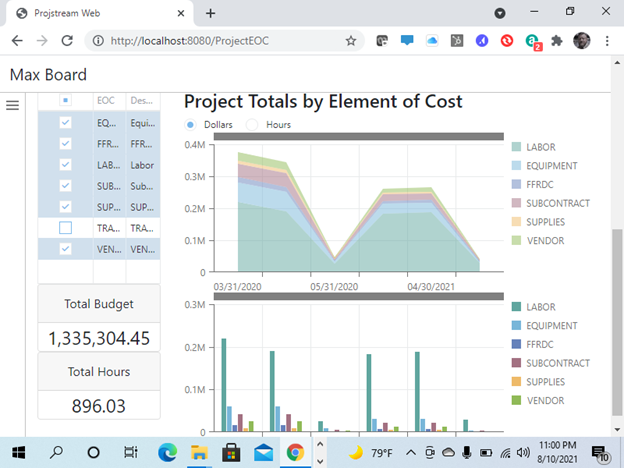
    ProjStream’s Dashboard tool for BOEMax and EVMax. MaxBoard ships with preconfigured dashboard objects but the real power comes from the ability for the user to create their own custom dashboards based on ProjStream’s proprietary data object engine.

  • EVMax Deliver!

    To prevent automated spam submissions leave this field empty.

    Formats
    IPMR Formats 1-5 and 7 are available in accordance with the new OUSD (Office of Under Secretary of Defense) DID (Data Item Description) DI-MGMT-81861. CPR reports (Cost Performance ) are being phased out. IPMR format 6 is also a new requirement; IPMR 6 is IMS or Integrated Master Schedule data. All of these formats are required to be delivered in the new UN/CEFACT xml format. ProjStream delivers these formats directly out of the IPMR reporting engine.

    Change Management
    Use ProjStream’s suite of tools to manage contract and baseline changes with unprecedented change tracking, budget change request and work authorization work flow documentation and routing.

    Higher Success Rate
    High visibility into change control and trend analysis enable better communication with your customer. Better communication and visibility eliminate those surprise moments that can damage a program or even cause a program termination.

    On Time
    It is hard enough to get the performance updates completed and correct, feed in actual costs and get the forecasts correct. When this information has to be corrected and optimized you want to be able to automate the processing and reporting portion of this and that is where EVMax comes in and allows you to recover time.

  • EVmax Forecast

    Forecasting
    We like to define forecasting as a way of looking at possible variations in factoring the remaining budget on a project. Additionally we typically recommend generating a range of forecasts as part of a typical EAC generation process. Optimistic and Pessimistic approaches help to generate the bandwidth of this range and somewhere in that range you would come up with a most likely forecast.

    Some of the forecast techniques that are available are:

    1. PF = 1. This technique generates a forecast according to your remaining budget. This assumes that you are going to perform directly in alignment with your remaining budget.
    2. PF= 1/CPI. This technique assumes that the remaining budget will be factored according to the cumulative cost performance to date.
    3. PF= 1/CPI*SPI. This is a more pessimistic approach because it takes schedule performance into account as well as cost performance. If both cost and schedule performance are under par, this can lead to an inflated forecast.
    4. PF= 1/ (a)CPI * (b)SPI. This is also a more pessimistic approach, however in this calculation you get to weight cost and schedule.
    5. Maintain EAC as constant. This is simply a method that reduces the forecast according to the actuals that came in. This is obviously a very optimistic approach, particularly if the CPI is less than one.


    Rates
    Update the forecast according to the latest go forward pricing rates to see the effect that the rates have on performance and the estimate at completion.

    Trending & Analysis
    EVMax has the capability to show trends in project forecast data from period to period at any level by maintaining historical forecast data. Additionally EVMax can show contract budget trends from period to period.

    Generate Forecasts:
    Generate as many forecasts as necessary for a specific period to develop a range of forecasts between optimistic and pessimistic based on EVMax forecast algorithms.

    How realistic is your EAC. Leverage the power of BOEMax to quickly view TCPI indicators and take a dose of EAC reality!

    Historical Actuals
    Capture Historical Actuals for available reuse in the BOEMax BOE Search Library. BOEMax queries both the historical estimates as well as historical actual costs from the EV system for the purpose of analogous estimates.

  • EVMax Execute

    Smart Status Updates
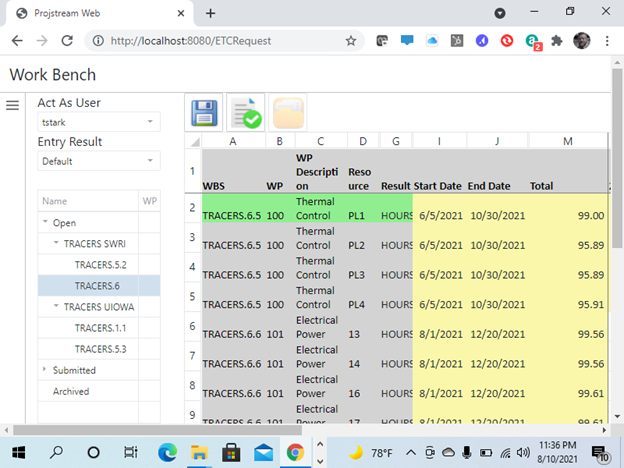
    Engineers, CAM’s and team members can log into the system and update task status if they have been assigned. Updates can be done online or in a client server environment.

    Earned Value Techniques
    EVMax has over 10 earned value techniques available including % complete, 50-50, 0-100, 100-0, milestones, user defined, level of effort and earned as spent.

    Real Time Visuals
    EVMax has visual indicators of performance within the application as performance relates to the work breakdown structure. Older systems without graphics look very much like spreadsheets without clear visuals. EVMax creates a paradigm shift in the way performance data is managed and understood.

    Change Control
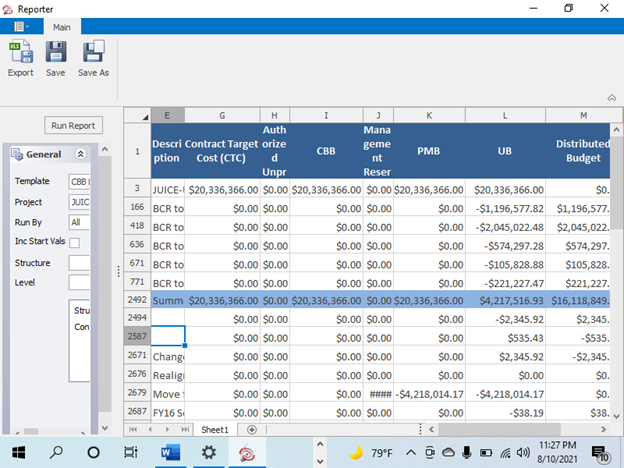
    The Program Log is used to track all Program Manager approved changes to the Contract Value, the Contract Budget Base (CBB), the Performance Measurement Baseline (PMB), Management Reserve (MR), and Undistributed Budget (UB).

    Program Log Tool - automates this process through and helps to ensure accurate capture of all approved contract and baseline changes.

  • EVMAX Plan

    Scheduling Interface
    Modify plans manually or through integration of MS Project or Primavera. Integrate with data such as baseline budget, activity status and forecasted effort. EVMax takes into account the time phasing capability of scheduling systems. Additionally you can pull your proposal into EVMax directly from BOEMax. We also give you the ability to import baseline data from Cobra.

    Workflow
    EVMax contains a world class work flow capability in which administrators can help in designing workflow capabilities. This includes the construction of forms with standardized fields and electronic approvals from the user base. This can be very helpful in integrating process into the application. Exisiting forms include Work Authorization, BCR (Baseline Change Request), and CAP (Control Account Plan).

    Excel Interface
    Load data via excel or export data to excel. EVMax allows you to load WBS data, resources, task information, rates, bill of material, actual hours, costs etc. If you can imagine it, we have a way to map data into EVMax from Excel.

    Planning
    EVMax is more than just an earned value tool. It is also a strong analytical application and can be used to capture historical actuals. Along with this, parametric types can be defined and captured within the system. Define cost drivers and independent variables within EVMax and use this valuable data to create better estimates in BOEMax.

  • EVMax

    EVMax
    EVMax is an earned value engine designed to begin with data generated from BOEMax. Both applications interface with MS Project to bidirectionally exchange data for the purpose of iterative planning. EVMax is designed to be the earned value cost engine that is not over-engineered for simple implementations, but it does scale to ANSI/EIA 748 needs with change control and budget logs, CPR format reports etc. EVMax is also part of the VPA engine (Virtual Parametric Analyst). This is where the team captures the cost driver inputs (i.e. lines of code) or maps scrap to material base in order to plot points for a parametric type. This data feeds back to BOEMax for parametric type tasks. It is in BOEMax where we plot the points and recommend the dependent value (manhours, etc.) based on the cost driver input.

  • BOEMax Win!

    To prevent automated spam submissions leave this field empty.

    On Premise - BOEMax can be installed on your companies servers and accessed by the client machine in a traditional client/server delivery. However, all ProjStream products have the capability for a hybrid delivery model even when the install is an on premise solution. In other words users can access the application in the traditional client server sense and then when they are out of the office they can access the application via the web service approach. Of course if your company's security policy does not warrant a web service connection then this can be deactivated.

    ProjStream Cloud - BOEMax can be online within 5 minutes with this approach. BOEMax is delivered purely as a web service in this environment and ProjStream manages the server aspects of the delivery.

  • BOEMax Bid

    Cost Volume
    Produce the cost reports necessary for proposal delivery directly out of BOEMax. Save time and money by leveraging the validation capability, workflow, documentation, versioning and customized coding abilities. If your team is spending an inordinate number of hours combining word documents with Excel and reports from pricing and contracts you may want to look at BOEMax.

    Powerful User Defined Reporting
    Select hierarchical groupings such as WBS, CLIN, OBS, Resource, Tasks, etc. as well as how costs will be displayed. Then modify this information on a pivot type interface to get the data out that you put in. This reporting tool includes logic development and filters that are so easy to use IT will never have to be bothered.

    Proposal Versioning Reports
    Produce reports that give information on changes between versions of a proposal. This data leaves a trail of information when you are in negotiation stages or there are options that are being proposed, etc. Now you don't have to rely on backups to give you this information, simply set a version at each appropriate point and run comparison reports.

    Approved Pricing
    Leverage the proprietary BOEMax approved report to show how each cost element result line is calculated, the explicit rates within the database and the results themselves. Tab over to the next page of the report and perform a what-if analysis on rates and escalation for part or all of the resource pool and indirects to see the impact on contract price. This is all done in a report that is invaluable during audits and contract negotiations.

    Estimate Volume
    BOEMax has the ability to combine document category verbiage with estimates to produce the basis of estimate reporting needed for government contract submittals. Additionally you can combine really any document category into this report, items such as risks, SOW (statement of work), etc. These document categories can be created at either the WBS level or the task level.

  • BOEMax Price

    Libraries
    BOE Libraries leverage what you have done or proposed in the past. The BOE Search engine can look at both the proposal side and the actual execution side to help you build a BOE at a task or control account level, or even a project level. Project templates help you get your bid going quickly. Search for key project attributes of prior projects to help build a new proposal. BOEMax takes analagous estimating to a whole new level.

    Parametrics - Use the BOEMax parametric model to collect cost drivers and dependent variable data and use regression analysis to improve estimating confidence internally and build trust with your customers. Estimating systems are now getting much more scrutiny and if you have not heard of collecting parametric data for reuse in estimating - it's coming soon!

    Snapshots
    Save a snapshot of your proposal at any point to identify a negotiation point, a place in time, or to identify options. Then you can compare your current operating version to any other version, or you can compare multiple versions.

    This is a great negotiating tool and gives you answers in minutes.

    Pricing Validation
    BOEMax is the best pricing tool on the market because we make it so it's almost impossible to make errors. There are a number of validation checks that the software makes and flags any errors in warnings in configuration that may lead to pricing errors.

    Auditor quality rate traceability - Get confidence in your estimating system by leveraging our proprietary rate traceability system that puts auditors immediately at ease. Our system will answer their questions without you having to dig up the data or do any work. This system is proven in the use of DCMA and DCAA audits.

    Cost Models
    BOEMax can handle any kind of cost model necessary to output a winning bid.

    Escalation - BOEMax gives you the ability to escalate both direct rates and indirect rates according to your accounting disclosure statement. Escalation can be according to date effectivity but if you are also dealing with material BOEMax provides even more flexibility.

    Custom modeling of Escalation - The administrator can build their own expressions to model rate calculations so BOEMax can handle anything from a rate modeling standpoint.

    Quantity Price Breaks and Escalation - Discounted per unit material costs according to quantity can be built into the schedule, as well as date effectivity according to material escalation.

    Resource Apportionment - BOEMax gives you the automated flexibility to set apportioned resources, set a labor resource as a percentage of another labor resource or tie a labor resource to material as well. These automated rules make estimating the job easier if this logic applies.

    Budget Categories - If your RFP defines a requirement to break out the bid or budget into different buckets such as recurring engineering and non-recurring engineering, cost codes give you the ability to do that.

    Time phased costs - BOEMax gives you the ability to set dates on tasks and estimates and then reference escalation rules within time periods. Additionally there are spread distrubutions that can be defined at a system level and applied to an estimate to model the spread distribution of costs.

  • BOEMax Estimate

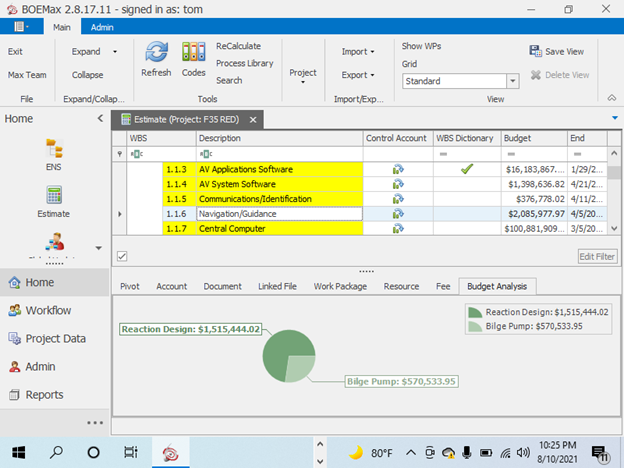
    Basis of Estimate Library - Searchable BOE database that picks up task action and object and returns all like tasks. Leverage the information from any of the historical BOE's to build a new BOE.

    Basis of Estimate / BOE Reporting - Rich Text editing allows you to enter basis of estimate text and format the document however you wish. Input a logo, insert a table, etc. and save rich text formats as BOE templates. BOE Reporting allows you to combine estimates with the verbiage in the BOEMax state of the art BOE reporting tool. Control pagination, page breaks, parse out estimates from the summaries as necessary and align verbiage with the level of data that was collected. The user can do all this on the fly with a simple set of checkboxes.

    Bottom's Up Estimating - Estimators, CAMs (Control Account Managers), Engineers and team contributors can easily create tasks or work packages and add resources. From that point the folks that are doing or estimating the work can build estimates in multiple ways:

    Divide by 8 Logic: This is the BOEMax default mechanism of estimating. Entering a resources hours will expand the daily duration by taking the resource with the highest amount of hours and dividing by 8. This is assuming that you set up your calendar as 8 hour days. For example if the resource on the task with the most hours is 40, the task duration will be 5 days.

    Define a Spread: This logic overrides the divide by 8 logic. The estimator can define the duration first in one of two ways: 1) Modify the start or end date of the task to redefine the spread duration. This will require a spread type definition (i.e. linear, back end load, etc) 2) Modify the duration directly. This method automatically drives the end date of the task and requires a spread definition also.

    Analagous Estimating - Leverage actual effort from historical projects to estimate like projects and use complexity factors. This can be done at a work package or task level or a wbs or control account level.

    Parametric Estimating (VPA - Virtual Parametric Analyst) - Define Parametric types at a system level and capture actual manhours or material dollars. The team doing the work will then enter productivity. The VPA then plots these points with regression analysis to then recommend the dependent variable value based on the independent variable input on the estimate side.

    System Audits
    The VPA will identify statistics like correlation coefficient, F-stat and T-stat in order to determine the cost driver applicability for that parametric. This functionality supports estimating system audits.

    System Support
    The VPA will also allow you to map pool and base systems like material and scrap with regression analysis, allowing estimating system support to indirect costs.

    Bill of Material (BOM) Interface - Map in bill of material data from your MRP system to quickly build material pricing.

    Bi-Directional MS Project Integration - Build up your estimate without having to know MS Project at all. Define tasks and their durations, add resources, hours and material dollars. Dump the data to MS Project and all the structures will be maintained, including WBS, tasks, codes, resources, hours, etc. The scheduler can then link the tasks with logic and then push the data back into BOEMax. BOEMax will respread the data according to the new dates and reprice the bid as necessary based on escalation. BOEMax maintains the MS Project linkages such that when the data is dumped to Project again, the links are maintained. BOEMax is truly an iterative planning tool in addition to estimating and pricing. Estimates can also integrate with Deltek Cobra if that is your EVMS tool.

    EVMax Synchronization - After your bid is submitted, transfer the estimate to EVMax as the beginning of the budget baseline. Iteratively plan between EVMax and MS Project or Primavera to develop the contract baseline.

    Primavera Bi-Directional Integration - Build up your estimate without having to know Primavera at all. Define tasks and their durations, add resources, hours and material dollars. Dump the data to Primavera and all the structures will be maintained, including WBS, tasks, codes, resources, hours, etc. The scheduler can then link the tasks with logic and then push the data back into BOEMax. BOEMax will respread the data according to the new dates and reprice the bid as necessary based on escalation. BOEMax maintains the Primavera linkages such that when the data is dumped to Primavera again, the links are maintained. BOEMax is truly an iterative planning tool in addition to estimating and pricing. Estimates can also integrate with Deltek Cobra if that is your EVMS tool.

    Excel Import and Export Mapping - Quickly build data structures using excel as an interface to BOEMax. For example, if your company has rates (both direct and indirect) with escalation already defined in excel you can easily map and pull this data into BOEMax. This functionality is pervasive throughout the system.

    Workflow: Set up hierarchical and/or peer to peer workflow. Track the progress of BOE's through workflow reporting and identify active review cycles.

    Security: Set up security by user, project and role. Some of the security attributes are read, write, lock, cost access, admin, etc.

    Estimate Locking: Lock estimates at the control account level. This provides exclusive write capability to a specific control account. Other users with access can read the data at that time but cannot write. BOEMax also provides a recursive lock so you can flow the lock down as many levels within that structure as necessary.

    Create Document Categories: Create unlimited document categories at both the work package or task level and the control account or wbs level. These categories are then available as a rich text document designed for being part of the BOE report engine. For example, create a SOW (Statement of Work) category at the WBS level and a BOE and Risk Category at the work package level.

    Rich Text Editing: Leverage the BOEMax rich text editor to input verbiage and link it to a basis of estimate, statement of work or any document category you can think of. The rich text editor has attributes very similar to MS Word such as font size and style, find and replace, spell check, insert an image or a table etc. The BOEMax reporter will save the rich text formatting as defined by the user for very professional report submittals.

    Link or Store Files: Link files from a file share and BOEMax will be able to launch the file from this link, provided the user has access to the file. Additionally, BOEMax has the ability to store files in the database and integrate with sharepoint.

    Engineer and CAM Friendly: The main estimating screen makes it very easy to add tasks and resources in an excel like grid matrix. Engineers can modify task durations as well as how the hours or dollars are distributed over the task. Additionally they can leverage the VPA (Virtual Parametric Analyst) or the BOE Library to build estimates from historical data.

    Spread and Reprice Estimates on the Fly: Changing task durations and or spread curves will modify pricing as necessary based on escalation rules set up within the system. Interface with schedules and picking up new dates from Primavera or MS Project will also automatically reprice the data per the new dates.

    Logic Builders: Users can create if, then, else statements to create global changes based on logic. An example might be to increase the estimated manhours by 10% for all software engineers in WBS 1.2.

    Filtering: Filter data columns by just simply typing information in the column header to down select the rows. This can be done on multiple columns at once to filter down to easily find data within large data sets.

    Pivot Table: The main estimating screen is set in an excel like interface that has pivot capability. The user is able to filter resources and/or work packages in this view. Engineers can enter manhour estimates or material dollar estimates directly into the pivot grid.

  • BOEMax

    BOEMax
    BOEMax is a unique estimating and pricing tool that combines the ability to draw from historical estimates and actuals to build new estimates and proposals. Leverage the BOEMax basis of estimate library to create new estimates using complexity factors and build the basis of estimate from an analogous standpoint. Additionally capture cost driver history (independent variable) against the dependent variable (i.e. manhours, material dollars, etc) to support better estimates for similar parametric types or activities. Create solid price proposals and basis of estimate formats from our easy to use report engine.

  • Enterprise Suite


    BOEMax


    EVMax


    MaxBoard


    SplashBoard

    Easy To Use Estimating System - Earned Value and Dashboards
    For contractors who need an easy to use collaborative proposal tool ProjStream provides BOEMax, an estimating system that will support audits but is as easy to use as Excel. Reduce the time for proposal setup by deploying BOEMax's (cloud-based or on-premise) solution and reduce the time spent in negotiations and audits by leveraging the what if capabilities and reporting. Unlike other pricing and proposal software packages that provide only pricing reports, ProjStream delivers BOEMax, the only tool on the market that has built in parametric estimating, analagous estimating and earned value as well as bi-directional integration with scheduling software. Don't just build an estimating or earned value system, build a synchronized center of excellence.

    Unique Solutions
    ProjStream solutions are unique because of the flexibility with which they can be deployed. The applications are developed on a .NET framework and can be delivered via traditional client/server enterprise mode or via the web. Additionally a hybrid mode can be deployed in that client server and web connections can happen within the same environment. This is applicable if you have internal users as well as users that need to access the system remotely. Additionally our applications are ready to run on mobile platforms.

    ProjStream technology specs:
    Database support:
    Microsoft SQL Server 2008/2012
    Client Platform Support:
    Windows XP
Windows 7
Windows 8
    Database Server Server Platform:
    Windows Server 2008

    Windows 2003


    Deployment Modes:


    Client/Server
    
Hybrid Client/Server & Web

    Cloud

    BOEMax
    BOEMax is a unique estimating and pricing tool that combines the ability to draw from historical estimates and actuals to build new estimates and proposals. Leverage the BOEMax basis of estimate library to create new estimates using complexity factors and build the basis of estimate from an analogous standpoint. Additionally capture cost driver history (independent variable) against the dependent variable (i.e. manhours, material dollars, etc) to support better estimates for similar parametric types or activities. Create solid price proposals and basis of estimate formats from our easy to use report engine.

    EVMax
    EVMax is an earned value engine designed to begin with data generated from BOEMax. Both applications interface with MS Project to bidirectionally exchange data for the purpose of iterative planning. EVMax is designed to be the earned value cost engine that is not over-engineered for simple implementations, but it does scale to ANSI/EIA 748 needs with change control and budget logs, CPR format reports etc. EVMax is also part of the VPA engine (Virtual Parametric Analyst). This is where the team captures the cost driver inputs (i.e. lines of code) or maps scrap to material base in order to plot points for a parametric type. This data feeds back to BOEMax for parametric type tasks. It is in BOEMax where we plot the points and recommend the dependent value (manhours, etc.) based on the cost driver input.

    MaxBoard
    ProjStream’s Dashboard tool for BOEMax and EVMax. MaxBoard ships with preconfigured dashboard objects but the real power comes from the ability for the user to create their own custom dashboards based on ProjStream’s proprietary data object engine.

    SplashBoard
    Integrated cost and schedule analyzer that reads in IPMR UN/CEFACT XML formats 1-7 and presents analytics for the data in a Splash.

DON'T JUST BUILD AN ESTIMATING OR EARNED VALUE SYSTEM. BUILD A SYNCHRONIZED CENTER OF EXCELLENCE.

Travel through the ProjStream Website to learn how to win more with BOEMax and deliver with EVMax.

To start your journey, click the launch button.

Home Page content goes in this region